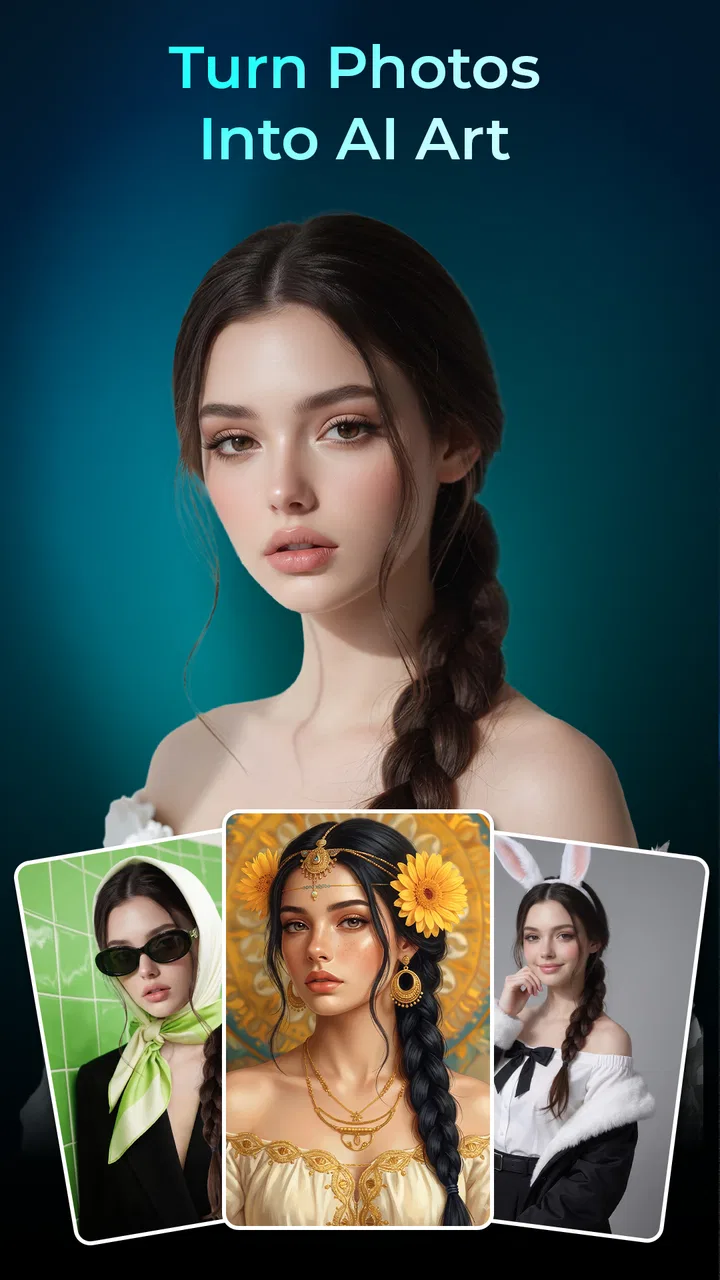
Artorys: AI Photo Art
- 4.5
- Rating
- 5.00M
- Installs
- Free
- Price

 Analysis by App-foxy
I tried Artorys: AI Photo Art as a lightweight way to turn ordinary pictures into stylized artwork, and my first impression is that it aims for immediate results rather than a full digital-art workspace. That distinction matters. This is an Art & Design app for people who want to experiment with an image quickly, not necessarily for somebody building a carefully controlled illustration from the ground up.
The basic appeal is easy to understand: start with a photo, apply an AI-driven artistic treatment, and see whether the result feels worth saving or sharing. In my experience, that kind of simplicity can be more useful than a crowded editor when I only want to refresh a profile picture, create a playful image for a group chat, or test a visual idea without learning a complicated interface.
Artorys is free and rated for Everyone, which makes it approachable for casual users and families looking for a low-commitment creative tool. It has reached over five million installs and holds a 4.5 average from around five thousand ratings, so it has clearly attracted a sizeable audience. Those figures suggest a mature enough user base to take seriously, while still leaving room for the app to develop.
You May Also Like

 Blood Strike: 2.5 Anniversary
Blood Strike’s Loadouts Turn Every Drop Into a Tactical Gamble
A close look at Blood Strike’s custom loadouts: how fast access to signature weapons reshapes its battle royale rhythm, rewards preparation, and narrows the gap between fights.

 Pandora - Music & Podcasts
Pandora’s Music Is Easy to Start, but Harder to Recover
Pandora’s strength is its low-effort path from a seed to a station. Its weak spot is how much confidence it asks you to place in connection, setup, and quiet recovery.

 8 Ball Pool
 Is Built on Rivalries, Rematches, and Routine
A close look at the rivalries, rematches, shared routines, and unanswered safety questions that turn a quick pool match into a persistent mobile community.

 Samsung Music
’s Quiet Strength Is Playing What You Already Own
Its reach comes less from spectacle than from dependable access to a personal library. That simplicity is both the app’s strongest retention engine and its ceiling.

 AccuWeather: Weather Radar
AccuWeather Review: A Quick, Clear Forecast for Everyday Decisions
For everyday plans, the best forecast is the one you can understand quickly. AccuWeather makes rain timing, radar, and local conditions easy to act on, with a few trade-offs.

 Hill Climb Racing
Why Hill Climb Racing Still Turns Crashes Into One More Run
A tiny car, a bumpy hill and one more upgrade: Hill Climb Racing keeps resurfacing because its simple chaos makes every near-miss feel personal.
More From Our News Desk



How Artorys feels in everyday use
When I think about using Artorys on a shared household device, the useful question is less about who can make an image and more about whose photo is being transformed and where the result might go. I’d treat each experiment as a personal creative choice, then move on to the practical boundaries that make shared use more comfortable.
A quick route from camera roll to artwork
The strongest part of the experience is the short distance between having a photo and trying an artistic version of it. I do not need to think like a painter before opening the app. A portrait, a travel snapshot, or even a picture of an object can become a starting point for experimentation.
That makes it especially handy in small, realistic moments. Imagine taking a family photo at lunch and wanting a more imaginative version before sending it to relatives. With a conventional image editor, I might spend time adjusting contrast, color, texture, and effects separately. An AI art app is attractive because it compresses that decision into a more visual, exploratory process.
I also see value in using it for profile images and informal social posts. A normal selfie can feel too ordinary, while a heavily edited image can look artificial or overworked. The useful middle ground is to generate several artistic directions, then choose the one that still resembles the original person. That last step is important: the most dramatic result is not always the most usable one.
Where the current version fits
The current version is 1.1.2, and I read that number as a sign of an app that is still relatively early in its product life rather than a finished professional suite. The experience is focused enough to be approachable, but users who expect the depth of a desktop art program should adjust their expectations.
That focus is not automatically a weakness. A narrow tool can be easier to understand than a large editor filled with layers, masks, brushes, and technical controls. Artorys makes more sense when the goal is visual discovery: upload something familiar, see how an AI interpretation changes it, and decide whether the result has personality.
At the same time, a streamlined workflow can leave advanced users wanting more control. If I need to preserve a specific facial detail, direct the position of an object, or make a series of images share exactly the same visual treatment, I would rather use a tool built around manual editing or a more specialized generative workflow.
What the developer’s direction suggests
Artorys is developed by 360Control Center - PDPAPP. The version currently available gives me a snapshot of the app’s present direction: accessible AI image creation with a low barrier to entry. I would not treat the current release as proof that it is trying to replace established design software. It feels more like a convenient creative layer for people who normally would not open a design application at all.
That distinction also helps explain the broad audience. The Everyone rating and free access make it suitable for casual exploration, and the large install base indicates that the concept is easy for many people to understand. Someone can approach it with a single photo and no previous experience with digital art.
Three practical ways to get better results
My first tip is to choose the source image more carefully than you might expect. A clear subject with a simple background gives the transformation a better chance of producing an image that remains recognizable. A crowded photo can still be interesting, but it makes it harder to judge whether the artistic treatment is genuinely good or merely hiding details.
Second, I would keep an untouched copy of the original before experimenting. AI art tools are most enjoyable when I can compare the transformation against the starting image rather than trying to remember what changed. This is particularly useful with portraits, where a visually attractive result may quietly alter facial structure, hair, or small identifying features.
Third, I would use the app as part of a two-stage workflow instead of expecting it to finish everything. Artorys can provide the creative direction, while a familiar photo editor can handle cropping, brightness, text, or final framing afterward. That combination is often more practical than demanding one app perform every task.
What happens to existing users after an update
For somebody already using Artorys, version 1.1.2 is best viewed as the current reference point for the experience. Existing users should judge it by whether the core process remains fast and understandable, not by expecting a completely different product with every version change.
The benefit of a focused app is that returning users can usually keep the same mental model: choose an image, explore an artistic result, and decide what to do with it. The trade-off is that experienced users may notice the limits more clearly over time. After repeated use, novelty can fade if the creative process does not offer enough ways to steer or refine the output.
I would also recommend that regular users develop a personal selection habit. Instead of accepting the first striking image, compare it with the original at full size, look closely at faces and fine objects, and check whether the composition still works after cropping. AI-generated art can look impressive in a small preview while becoming less convincing when inspected closely.
Who should use it, and who should skip it
Artorys is a good fit for casual creators, students exploring visual ideas, families making playful images, and social-media users who want something more distinctive than a standard filter. It is also useful for people who feel intimidated by traditional design software. The app gives them a way to begin with a personal photo instead of a blank canvas.
I would be more cautious about recommending it to professional designers who need repeatable production results. If a client expects exact brand colors, consistent character appearance, editable layers, or precise object placement, an AI photo-art app is unlikely to be the right primary tool. The same applies to artists who want to build an image stroke by stroke and maintain complete authorship over every visual decision.
It may also be a poor choice for anyone who dislikes experimentation. The appeal depends on being willing to try an interpretation that may not match the original intention. If you want predictable retouching, a conventional editor is usually better. If you want a polished illustration with detailed manual control, a drawing application is a stronger choice.
How it compares with familiar alternatives
Compared with a standard filter app, Artorys is more interesting when I want the image to feel transformed rather than simply warmer, sharper, darker, or more colorful. Traditional filters are predictable and efficient, which is exactly why they remain useful. AI art tools trade some predictability for a stronger sense of reinterpretation.
Compared with a full photo editor, Artorys is less about correction and more about style. A conventional editor wins when I need to remove distractions, adjust a specific area, or prepare an image for a precise layout. Artorys wins when I want to ask, in effect, “What else could this photo become?”
Compared with a drawing app, it starts from existing visual material rather than requiring me to create every element. That makes it faster for photo-based ideas, but less suitable for building an original composition with complete control. I would use Artorys for concept exploration and a drawing or editing tool for the final, carefully constructed piece.
Remaining gaps that affect the decision
The central limitation is the same feature that makes the app approachable: the process is intentionally simplified. A quick AI transformation can produce a memorable image, but it can also introduce changes I did not request. Portraits are especially sensitive because small alterations to eyes, hands, hair, or facial proportions can make the result feel less natural.
There is also a creative-control trade-off. The less time I spend directing the image, the more I have to accept the app’s interpretation. That is enjoyable for casual discovery, but frustrating when I have a specific visual target. Users should approach each result as a draft or variation rather than assuming the first output is a finished artwork.
Another practical issue is consistency. If I am preparing several images for a single project, I need them to look like they belong together. A one-off transformation may be excellent, yet a collection can feel uneven if each image receives a different treatment. For that reason, I would test a small batch before committing to a larger set of invitations, posts, or portfolio concepts.
Because the app is free, it is easy to try without making a financial commitment. That lowers the risk for curious users, but it also means I would still pay attention to the actual workflow before relying on it for important work. A free tool can be perfect for experimentation while remaining unsuitable for a deadline-driven professional process.
Questions I would ask before installing
Can a beginner use it? Yes, that is where Artorys makes the most sense. Its photo-first approach removes the blank-page problem, and the result is easier to understand when the starting image is familiar. I would begin with a well-lit photo containing one obvious subject.
Is it suitable for children? The Everyone rating makes it broadly accessible from an age-classification perspective. Even so, I would guide younger users when they are working with personal photographs, particularly if they plan to share the results publicly. Creative simplicity does not remove the need for sensible decisions about images.
Does it replace a professional editor? In my view, no. It can complement one by generating a visual direction or a playful variation, but it is not the tool I would choose for detailed retouching, exact layouts, or a controlled production pipeline.
Will every result look natural? No. The store summary emphasizes natural-looking AI art, but “natural-looking” should be treated as an aim rather than a guarantee for every photo. Source quality, subject complexity, and the chosen artistic direction all influence whether the result feels convincing.
Is it worth trying if I only edit photos occasionally? Yes, especially because it is free and does not require a long learning period to understand the idea. Occasional users may get more value from a quick creative experiment than from installing a large editor they rarely open.
What I would watch in future releases
The most meaningful future progress would be better control without sacrificing the app’s approachable character. I would like to see improvements that help users protect important details, guide the visual direction more clearly, and keep a consistent look across multiple images. Those changes would expand Artorys from a novelty tool into a more dependable part of a creative workflow.
I would also watch how the app balances speed with refinement. The quick first result is valuable, but returning users need reasons to keep exploring after the initial surprise wears off. Useful iteration tools, clearer ways to compare variations, and practical finishing options would make the experience more rewarding without turning it into a complicated studio.
For now, my recommendation is straightforward: try Artorys if you want an easy, free introduction to AI-assisted photo art and enjoy judging creative variations for yourself. I would not choose it as my only editor, and I would skip it if precise control matters more than experimentation. Its real strength is turning a familiar photo into a starting point for ideas, not promising to replace every tool that comes afterward.
That makes the app worthwhile for the right kind of user. I can open it with an ordinary image, explore a different visual identity, and then decide whether the result belongs in a message, a profile, a personal project, or nowhere at all. In its current form, that focused experience is more convincing than pretending it is a complete art suite.
FAQs for Artorys: AI Photo Art
01What is Artorys: AI Photo Art, and what can I use it for?
Artorys: AI Photo Art is an AI-powered photo editing and image-generation app designed to transform ordinary pictures into artistic creations. You can use it to apply creative styles, experiment with visual effects, enhance portraits, and produce images suitable for social media, profile pictures, wallpapers, or personal projects. The final results depend on the original photo, selected style, and the app’s available AI tools.
02Is Artorys: AI Photo Art free to download and use?
The app may be available to download for free, but some features, styles, export options, or advanced AI tools can require in-app purchases or a subscription. Before confirming a payment, review the pricing, billing frequency, trial conditions, and cancellation rules shown in the store or inside the application. Free access may also include advertisements, usage limits, watermarks, or a restricted selection of artistic effects.
03Does Artorys: AI Photo Art require an internet connection?
Most AI photo applications need an active internet connection because image processing is commonly performed on remote servers rather than entirely on the phone. Artorys may therefore require Wi-Fi or mobile data when uploading photos, applying certain effects, or downloading completed images. Some basic editing functions could work offline, but users should not assume that every feature or previously unused style will be available without connectivity.
04Are my photos and personal data safe when using Artorys?
Before uploading personal or sensitive images, read Artorys’ privacy policy and the permissions requested by the app. AI processing may involve sending photos to external servers, and the service may collect technical, usage, or account information. Avoid uploading confidential documents, private images, or photographs of other people without permission. Also check how long uploaded files are stored, whether they are used to improve services, and how deletion requests are handled.
05What kind of photos produce the best results in Artorys: AI Photo Art?
For more convincing results, use clear, well-lit photos with the main subject visible and reasonably centered. Portraits usually work best when the face is not covered by sunglasses, hands, heavy shadows, or extreme filters. Images with low resolution, several people, cluttered backgrounds, or unusual poses may produce less accurate artistic transformations. It is also worth trying different styles, since some effects are better suited to portraits while others work better with landscapes or objects.
Pros
- Turns ordinary photos into creative AI artwork in just a few taps.
- Offers a convenient way to experiment with different artistic styles.
- Simple interface makes the app approachable for casual users.
- Useful for creating distinctive profile pictures and social media posts.
- Processing is generally quick for standard photo edits.
Cons
- Some styles may produce inconsistent faces or distorted small details.
- The best results often depend on using clear
- well-lit source photos.
- Advanced styles or features may be restricted behind a subscription.
- AI-generated images can look repetitive after extended use.
- Uploading personal photos may raise privacy concerns for some users.

Artorys: AI Photo Art
Gallery